

League of Legends is finally letting players use WASD controls in Ranked. The alternate movement scheme goes live in Solo/Duo and Flex queues with Patch 26.9 on 29 April 2026, the same day Season 2 Pandemonium begins. WASD has been playable in casual modes since December 2025, but Ranked has been off limits while Riot waited for win-rate parity with Point and Click. That gate has now cleared, and turning WASD on takes about ten seconds inside the in-game options menu.
When WASD Goes Live In Ranked
Patch 26.9 lands on Wednesday, 29 April 2026 (PT), based on Riot’s official patch schedule. It is the launch patch for Season 2 Pandemonium, and the first patch where WASD is enabled in Solo/Duo and Flex queues. The patch cycle runs for two weeks, with Patch 26.10 scheduled for 13 May.
WASD itself is not new. Riot rolled it out to ARAM, Swiftplay, Draft Pick, the Practice Tool, and rotating modes like ARURF in December 2025. What changes on 29 April is the queue restriction. Once the patch goes live, WASD is a fully supported control scheme across every queue in the game.
How To Turn On WASD In League Of Legends
The toggle lives inside the in-game options menu, not the client. You can switch between WASD and Point and Click at any point, including mid-match.
- Press Esc during a game to open the Options menu.
- Open the Input dropdown at the top of the menu.
- Select Keyboard (WASD).
- Scroll down to the Movement section to adjust the optional settings.

The first time you enable WASD, Riot automatically switches your camera to Dynamic Camera so your champion stays centred on screen. You can disable that under the Camera menu if you prefer the traditional locked-cursor feel. Scout Ahead, which lets you peek further across the map with the middle mouse button, is also enabled by default.
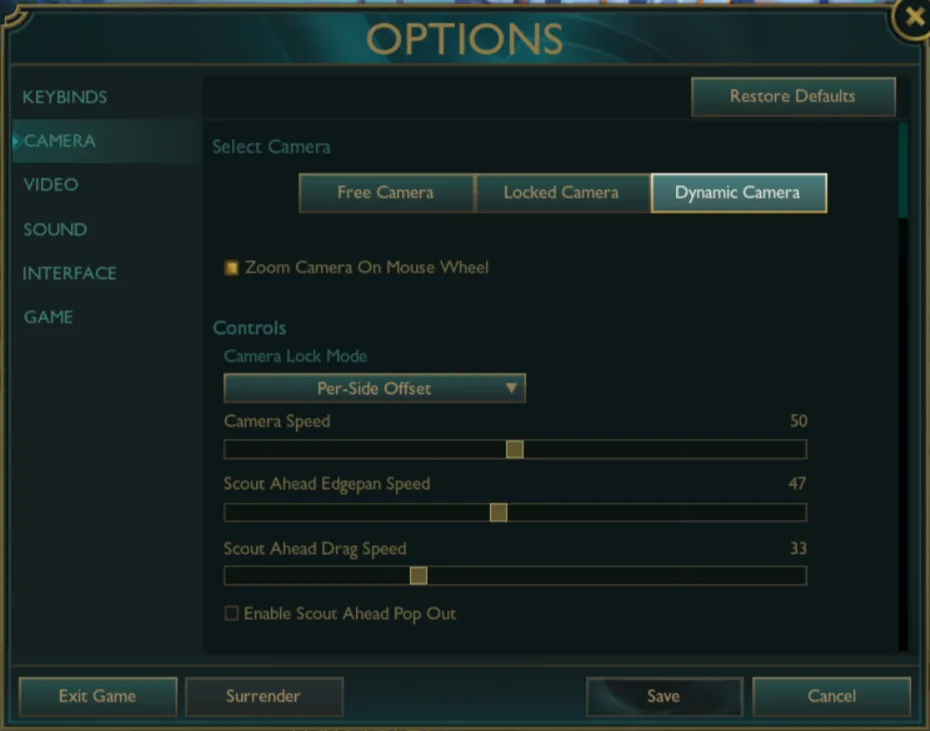
Switching back is the same flow in reverse. Press Esc, open the Input dropdown, and select Mouse (Point and Click). All your previous keybinds are saved, so you do not need to set them up again.
Default WASD Keybinds
WASD remaps abilities and summoner spells onto the keyboard’s left side, freeing the mouse for attacking and interacting. These are the defaults you will see the first time you enable the input.
| Action | Default Key |
|---|---|
| Confirm Cast | MB1 (left click) |
| Ability 1 (Q) | MB2 (right click) |
| Ability 2 (W) | Left Shift |
| Ability 3 (E) | E |
| Ultimate (R) | R |
| Summoner Spell 1 (D) | Q |
| Summoner Spell 2 (F) | F |
| Cancel Cast | C |
| Movement | W, A, S, D |
Auto attacking and interacting with map objects like Thresh’s lantern, Bard’s portals, and Hexgates all run through left click. If you press left click on an enemy outside your auto attack range, the game briefly displays your range indicator instead of issuing the command.
Item slots stay where they are. Quick Cast and Normal Cast both work in WASD, so you can keep your preferred casting style.
Read More: League Of Legends Voice Chat Confirmed, But Riot Says It Will Take Time
Useful Movement Settings Worth Tweaking
Two movement options under the WASD settings change how the input feels enough that they are worth testing in the Practice Tool before you queue Ranked.
Rotate WASD Inputs Relative To Map Lane Orientation
Summoner’s Rift is laid out diagonally, which means the default WASD layout forces you to hold two keys at once when walking up or down a lane. Toggling this option rotates the input grid 45 degrees counterclockwise, so W moves your champion from your fountain toward the enemy fountain, S retreats, and A and D run along the river axis. Riot credits a player suggestion for the idea, and it reduces hand strain on long sessions. It also frees up a key on laptops with limited simultaneous keypress support.
Flash Handling Type
Flash gets its own setting because cursor position and WASD direction can disagree at the moment you press D. The three options are Cursor (Flash follows your mouse), Movement (Flash respects your WASD direction and player rotation), and Movement with Cursor. The third option is the most accurate for most players, but it is worth running through all three in the Practice Tool to see which matches your muscle memory.
Champion-Specific Keybinds Are Already Live
Patch 26.8, which went live on 16 April, added the ability to set keybind profiles per champion for both WASD and Point and Click. That includes ability hotkeys and settings like toggling smart cast, which Rumble and Viktor mains have asked for repeatedly. You can configure profiles inside the Practice Tool and they save automatically across future games.
The setting matters more for WASD users than Point and Click users because hand position on the keyboard makes some default binds awkward depending on the champion. Setting one profile for hold-position champions and another for skirmishers is a fair starting point.
Riot’s Reasoning For The Ranked Greenlight
Riot held WASD out of Ranked because the team wanted to confirm two things: that WASD’s win rate would not exceed Point and Click’s, and that the gap between the two control schemes would stay small. Sentiment surveys sent to players after matches showed that opponents generally could not tell which control scheme the other lane was using, which Riot took as evidence that WASD was not creating an obvious gameplay advantage or disadvantage.
According to the Riot dev blog, Point and Click still holds a minor win-rate edge, but the gap is small enough that the team expects it to close as players gain WASD mastery. The studio said it will keep monitoring the stat after the Ranked release.
Accessibility Improvements Shipping Alongside
The input system overhaul that made WASD possible also unlocks several accessibility features. Players can now bind any input to move the mouse cursor directly, which has been the most requested accessibility change for years. Joystick play is supported through WASD remapping, though Riot has not committed to broader controller support. Almost every key on the keyboard is now bindable, with Delete and Escape as the only exceptions, and MB1 can be assigned to any action without operating system workarounds.
Required keybinds get warning labels in the options menu. You cannot leave the menu without movement keys assigned for WASD or a movement click assigned for Point and Click.
What To Watch After Launch
The first solo queue data after 29 April will show whether the win-rate gap between WASD and Point and Click holds, narrows, or widens once Ranked players are involved. Pro play is the other watchpoint. Riot has not signalled that any pro players plan to switch, but the option is now legal in officially sanctioned queues, and that alone will draw experimentation from coaching staffs willing to test fringe edges before the rest of the league catches up.